01 / QUICK RECORDINGA small moment.
A small moment.
An easy entry.
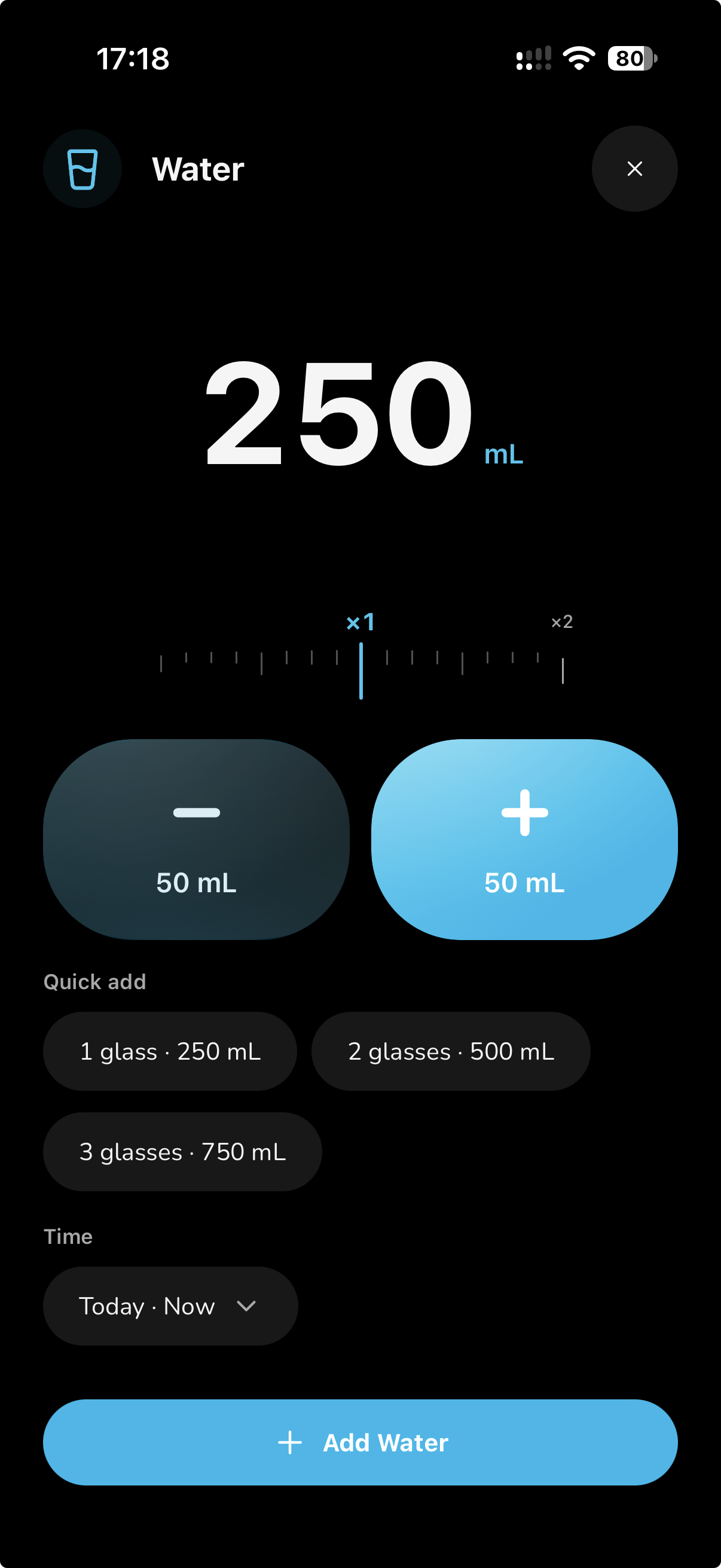
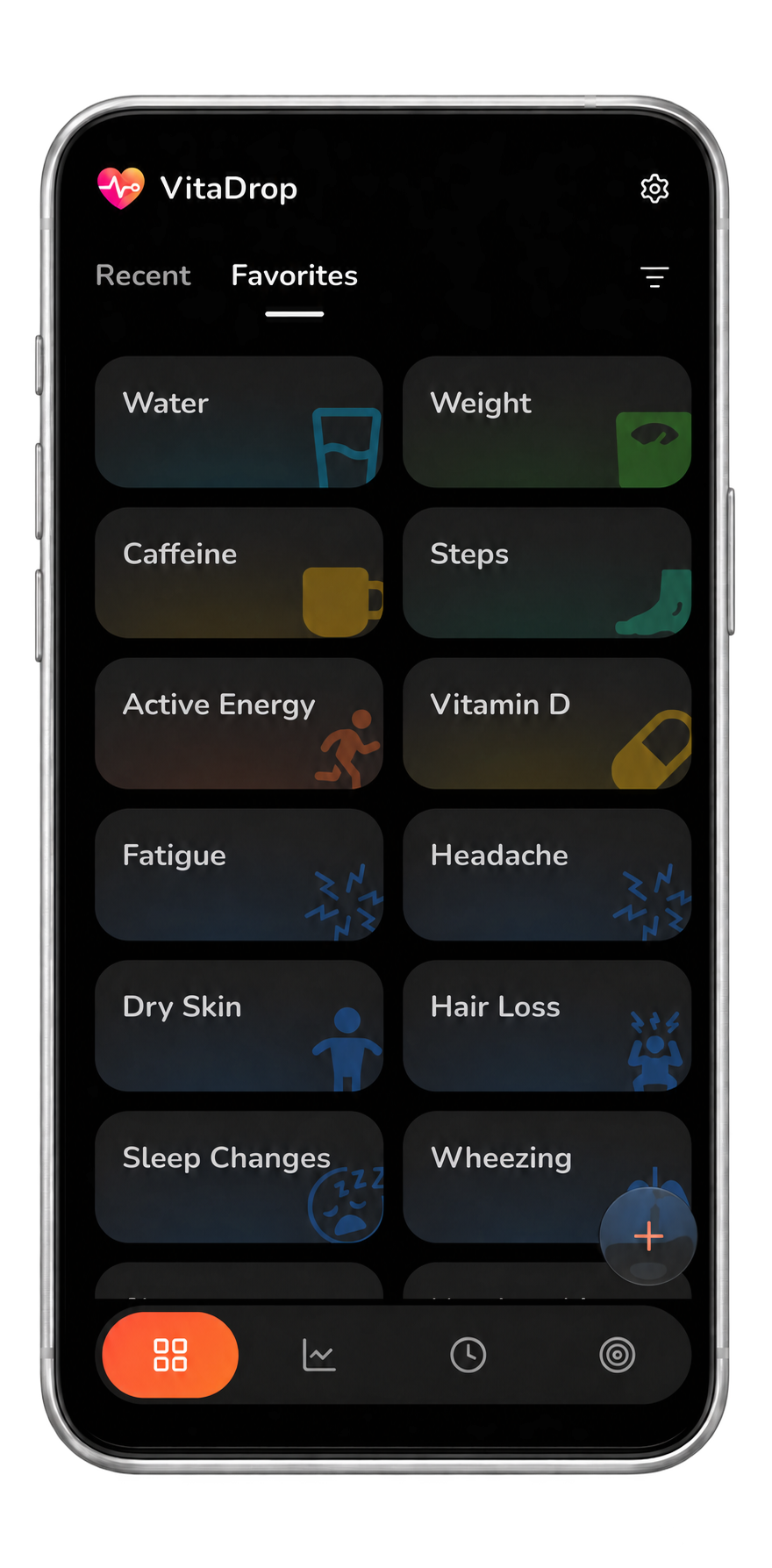
Switch between Recent and Favorites to find your shortcuts. Tap a tile to open a new entry, adjust the value and choose when it happened.
 VitaDrop
A little more in touch with you
Your everyday health companion.
The water you drink. The steps you take. The patterns you start to notice. Keep your entries, explore your history and make progress toward goals that matter to you.
Small habits, bigger picture
From a quick check-in to a month of progress. Your entries have a home in VitaDrop.
Switch between Recent and Favorites to find your shortcuts. Tap a tile to open a new entry, adjust the value and choose when it happened.
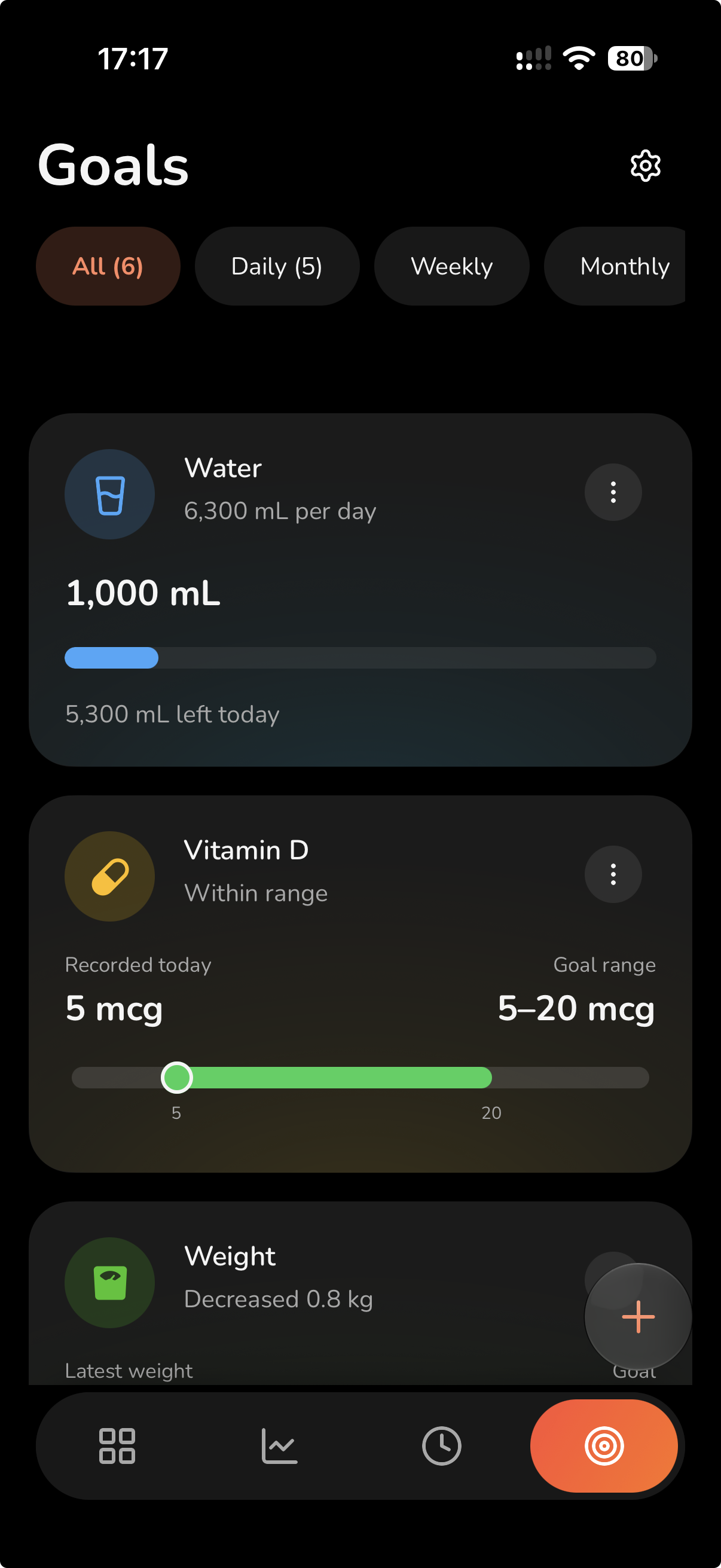
Targets, limits and ranges across 52 eligible types. Track activity, water, sleep, nutrients, self-care and ongoing measurements such as weight.
Open Chart to explore a day, week, month or year. Open History for individual readings, their sources and details. Filter by type and choose your date range.
Amounts use bars, measurements use points, and events use timelines. Different data deserves a different view.
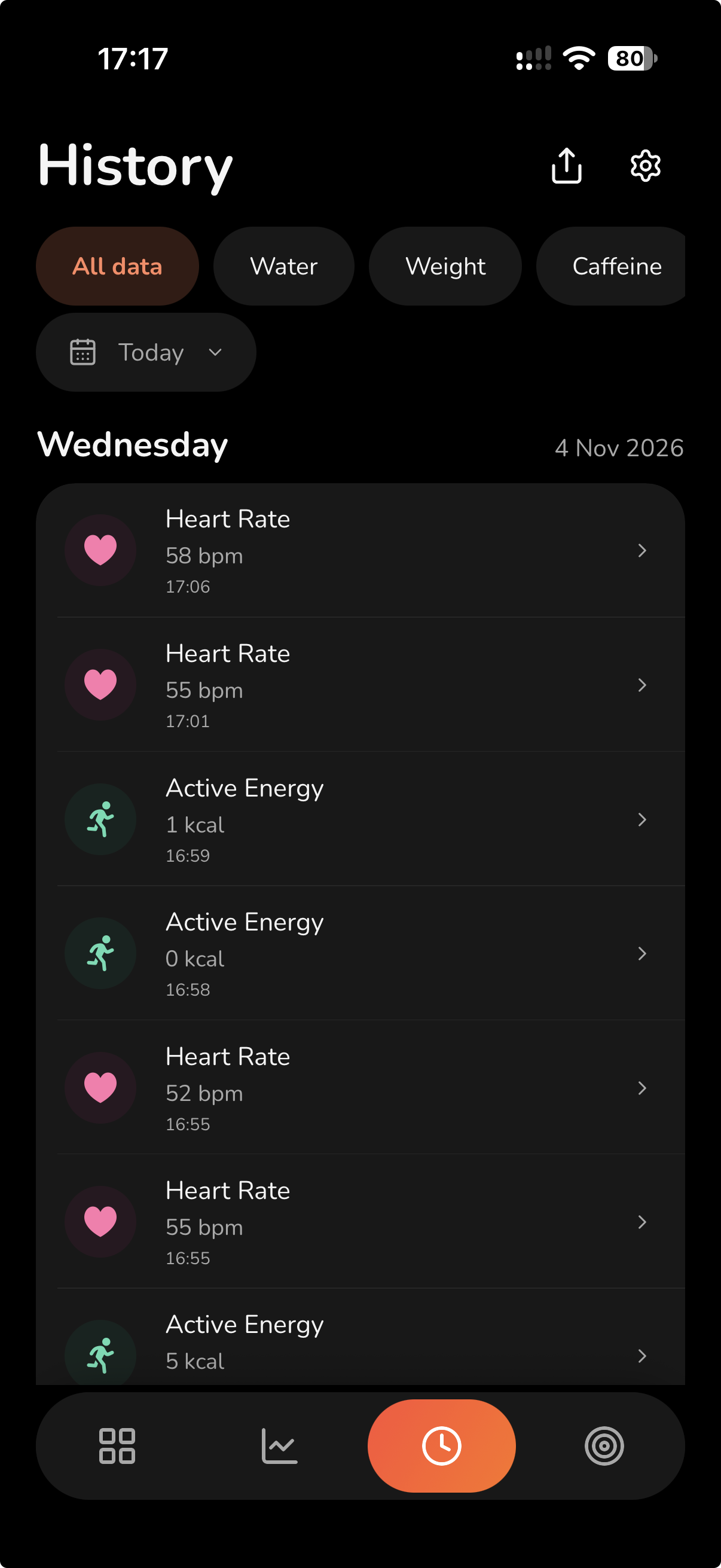
Actual app screenshots supplied in November 2026. Readings and targets are examples, not recommendations. Appearance and available readings vary by platform and permissions.
A little perspective
Explore recorded amounts over time. This website preview uses illustrative steps data, with the same calm, colorful approach as the app.
1,250 of 2,000 mL · Example day

Illustrative widget previews. Example targets are not recommendations.
Your everyday, in detail
Measurements, nutrition, symptoms and the moments in between. Explore every supported entry type, using the same icons as the app.
104 supported types across 8 categories. Open a category to explore.
Heart, breathing, temperature and blood measurements.
Record an amount in bpm.
Record an amount in bpm.
Record an amount in breaths/min.
Record an amount in °C, °F.
Record an amount in %.
Record an amount in mg/dL, mmol/L.
Record paired systolic and diastolic readings.
Body size and composition, recorded in your preferred units.
Record an amount in kg, lb.
Record an amount in cm, in.
Record an amount in kg/m².
Record an amount in %.
Record an amount in cm, in.
Everyday movement and recorded energy.
Record a whole-number count.
Record an amount in km, mi, m.
Record a whole-number count.
Record an amount in kcal, kJ.
Water, energy, nutrients and explicitly supplied meal values.
Record an amount in mL, fl oz, L.
Record an amount in kcal, kJ.
Record a meal with explicitly supplied nutrient amounts.
Record an amount in g, mg, mcg.
Record an amount in g, mg, mcg.
Record an amount in g, mg, mcg.
Record an amount in g, mg, mcg.
Record an amount in g, mg, mcg.
Record an amount in g, mg, mcg.
Record an amount in g, mg, mcg.
Record an amount in g, mg, mcg.
Record an amount in mg, g, mcg.
Record an amount in mg, g, mcg.
Record an amount in mcg, g, mg.
Record an amount in mg, g, mcg.
Record an amount in mg, g, mcg.
Record an amount in mg, g, mcg.
Record an amount in mg, g, mcg.
Record an amount in mg, g, mcg.
Record an amount in mcg, g, mg.
Record an amount in mcg, g, mg.
Record an amount in mcg, g, mg.
Record an amount in mg, g, mcg.
Record an amount in mcg, g, mg, IU.
Record an amount in mg, g, mcg.
Record an amount in mcg, g, mg.
Record an amount in mg, g, mcg.
Record an amount in mg, g, mcg.
Record an amount in mg, g, mcg.
Record an amount in mg, g, mcg.
Record an amount in mg, g, mcg.
Record an amount in mg, g, mcg.
Record an amount in mg, g, mcg.
Record an amount in mcg, g, mg.
Record an amount in mg, g, mcg.
Record an amount in mcg, g, mg.
Record an amount in mg, g, mcg.
Record an amount in mcg, g, mg.
Record an amount in mcg, g, mg.
Record an amount in mg, g, mcg.
Record how you feel using the supported symptom states.
Choose: Unspecified, Not present, Mild, Moderate, Severe.
Choose: Unspecified, Not present, Mild, Moderate, Severe.
Choose: Unspecified, Not present, Mild, Moderate, Severe.
Choose: Unspecified, Not present, Mild, Moderate, Severe.
Choose: Unspecified, Not present, Mild, Moderate, Severe.
Choose: Unspecified, Not present, Mild, Moderate, Severe.
Choose: Unspecified, Not present, Mild, Moderate, Severe.
Choose: Unspecified, Not present, Mild, Moderate, Severe.
Choose: Unspecified, Not present, Mild, Moderate, Severe.
Choose: Unspecified, Not present, Mild, Moderate, Severe.
Choose: Unspecified, Not present, Mild, Moderate, Severe.
Choose: Unspecified, Not present, Mild, Moderate, Severe.
Choose: Unspecified, Not present, Mild, Moderate, Severe.
Choose: Unspecified, Not present, Mild, Moderate, Severe.
Choose: Unspecified, Not present, Mild, Moderate, Severe.
Choose: Unspecified, No change, Decreased, Increased.
Choose: Unspecified, Not present, Mild, Moderate, Severe.
Choose: Unspecified, Not present, Mild, Moderate, Severe.
Choose: Unspecified, Not present, Mild, Moderate, Severe.
Choose: Unspecified, Not present, Mild, Moderate, Severe.
Choose: Unspecified, Not present, Mild, Moderate, Severe.
Choose: Unspecified, Not present, Mild, Moderate, Severe.
Choose: Unspecified, Not present, Mild, Moderate, Severe.
Choose: Unspecified, Not present, Mild, Moderate, Severe.
Choose: Unspecified, Not present, Mild, Moderate, Severe.
Choose: Unspecified, Not present, Mild, Moderate, Severe.
Choose: Unspecified, Not present, Mild, Moderate, Severe.
Choose: Unspecified, Not present, Mild, Moderate, Severe.
Choose: Unspecified, Not present, Mild, Moderate, Severe.
Choose: Present, Not present.
Choose: Unspecified, Not present, Mild, Moderate, Severe.
Choose: Unspecified, Not present, Mild, Moderate, Severe.
Choose: Unspecified, Not present, Mild, Moderate, Severe.
Choose: Unspecified, Not present, Mild, Moderate, Severe.
Choose: Unspecified, Not present, Mild, Moderate, Severe.
Choose: Unspecified, Not present, Mild, Moderate, Severe.
Choose: Present, Not present.
Choose: Unspecified, Not present, Mild, Moderate, Severe.
Choose: Unspecified, Not present, Mild, Moderate, Severe.
Supported observations, events and test results.
Choose: Unspecified, Light, Medium, Heavy.
Choose: Dry, Sticky, Creamy, Watery, Egg white.
Choose: Negative, LH surge, Indeterminate, Estrogen surge.
Choose: Negative, Positive, Indeterminate.
Choose: Occurred.
Sleep intervals and mindful time.
Record a sleep interval and its sleep state.
Record the start and end of a mindful session.
Everyday care sessions with a time or duration.
Choose: Completed.
Choose: Completed.
No matching types. Try another name or reset the filters.
This is the supported entry catalog, not a list of medical services. Workouts, diagnoses and medication logging are not supported. Apple Health availability and permissions vary by type; 52 types support Goals.
Your entries stay with your VitaDrop account until you delete them. Apple Health is an optional source and destination on iPhone.
Good to know
Public release is coming soon. VitaDrop is built for iPhone with iOS 18 or later and Android. Verified public store links will be added here when available.
Yes. Choose Skip during setup to start with access tied to this installation. Your entries are still stored with VitaDrop. Add Google or email/password in Settings to protect access and recover on another installation. Without linking a sign-in method, uninstalling can leave you unable to recover your data.
No. Manual recording, Charts, History, PDF reports, two active favorites and two Goals are included on Free. Apple Health is optional and available only on iPhone.
Use Google or email/password. Email registration needs verification before access; forgotten passwords can be reset from the sign-in screen. Add a sign-in method to your existing installation to keep its data. A different existing account is separate; accounts are not automatically merged.
There are 52 eligible types. Steps, Walking + Running Distance, Flights Climbed, Active Energy, Water and Mindful Session support daily, weekly or monthly goals. Added intake, sleep and self-care goals are daily. Measurements such as Weight and Blood Glucose use ongoing targets or ranges. These are personal tracking goals, not medical recommendations.
Explicitly connect from setup or Settings → Connect Apps and choose the available permissions. Chart, History, Goals, PDF reports and Goal Progress Widgets can then include available Apple Health readings, including older history. Those readings stay on your device. Eligible new VitaDrop entries can be delivered to Apple Health; enabling the link does not export older VitaDrop entries.
Changes wait in protected storage on this phone and retry when a connection is available. A pending change is not yet saved to your cloud account. You may see incomplete readings when a source is unavailable.
Yes. Choose one supported type and date range, include a chart, individual readings or both, export a PDF, then choose who receives it.
In Settings → Account, choose Delete data, then Delete and sign out. This permanently deletes your account and saved VitaDrop data. Existing Apple Health copies are managed separately. See our Privacy Policy for details about connected services. Account deletion does not cancel an App Store or Google Play subscription.